
Quick Guide
- To inspect Pixel Lineage gear, open Gear → Equipment and select one item. Read its lower-right attributes and restriction first, then compare the worn slots and aggregate bonuses on the left; highlighting a bag item does not equip it.
On this page
Pixel Lineage gear: read the selected item first
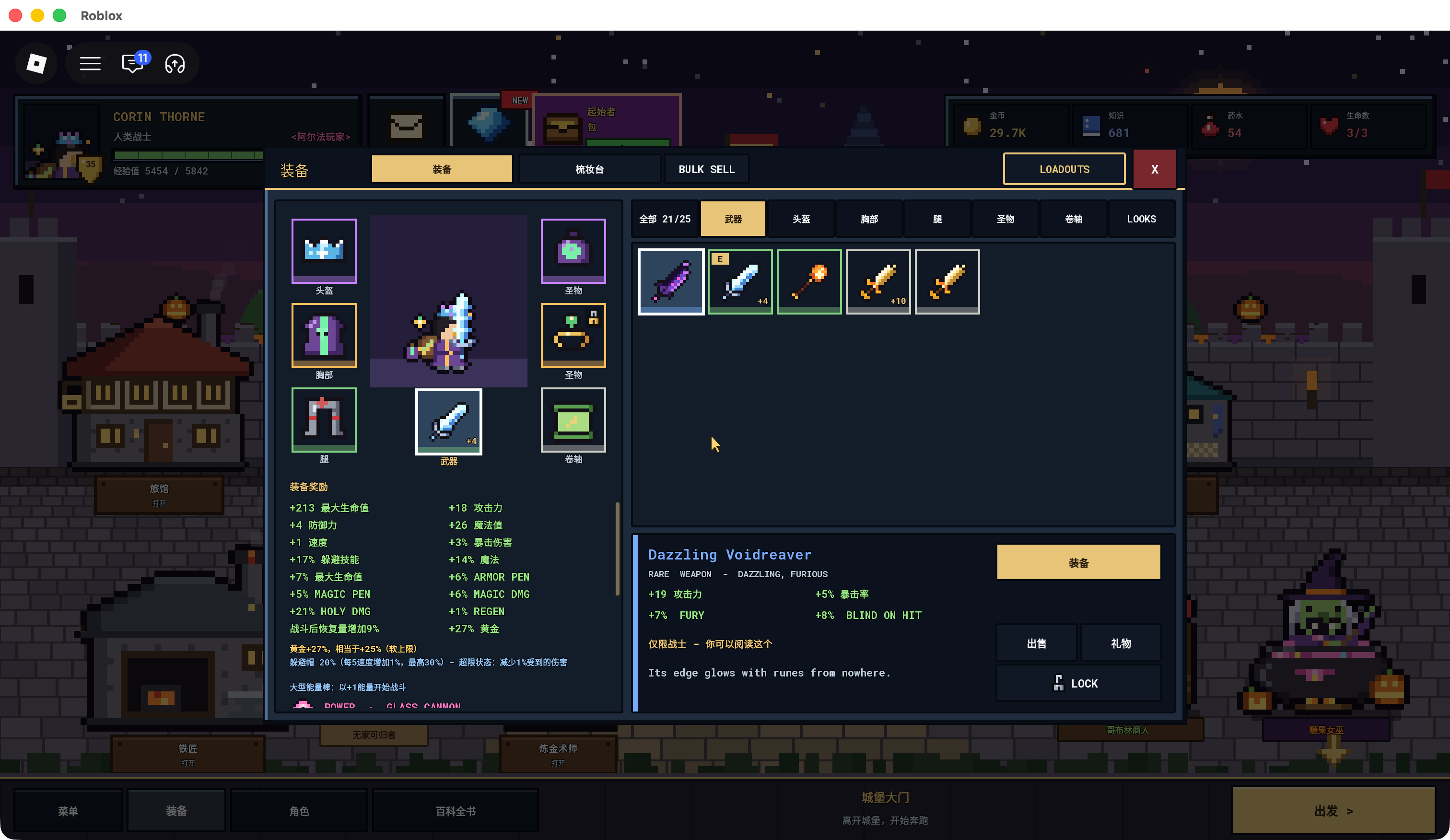
Open Gear, choose Equipment and select a category such as Weapon, Helmet, Chest, Legs, Relic or Scroll. Click an individual item to read its lower-right description. The worn slots and WORN GEAR BONUS at the left summarize your equipped setup, so they are not the attributes of the item currently highlighted on the right.
The reviewed English panel shows a weapon, three armor slots, two relic positions and a scroll position. Its category tabs and equipped markers help distinguish what you own from what you are wearing. The captured inventory count is that character’s capacity state, not the universal starting capacity of every hero.
Before replacing a worn item, compare the selected copy’s exact name, rarity, +upgrade, effects and any class restriction. If the panel offers Equip, the selected copy is a candidate replacement; a Take Off action identifies a worn item in the filmed example. Confirmation of the changed worn slot is more useful than assuming selection itself equipped it.
Compare one item with the complete worn bonuses
The player’s Dazzling Voidreaver panel gives +19 attack, +5% critical chance, +7% FURY and +8% BLIND ON HIT, with Warrior-only use. Those values belong to that selected Rare copy. The much longer list at the left contains the complete loadout’s bonuses.
A recipe preview, an owned copy and a next-upgrade preview are also separate records. Voidreaver’s crafting preview lists level 4 and +15 attack, while the selected +4 honing copy shows +25 → +27 attack toward +5. None of those numbers should silently replace the others as one universal base stat.
Use the weapon guide for the completed forge and the 375-Gold / one-material / 60%-success honing preview. That price is an action cost, not an auction price. The supplied honing screen does not show a successful +5 result or what a failed attempt consumes.
Inspect Powers and set conditions below the stats
Pyre on the recorded Lightbound Fists says hits deal +20% damage to burning foes. Mirror Ward on Swift Tempest Slippers says there is a 25% chance to bounce a harmful status back to its caster. They solve different problems, and a higher attack number alone does not describe either conditional effect.
The Tempest item also says 1/3 and WEAR ALL 3 before its Overcharge bonus. Selecting a set piece in your bag does not satisfy that requirement. Check the worn-set count and full condition before treating a tooltip’s three-piece effect as active.
Keep the selected Power separate from the aggregate list of Powers in WORN GEAR BONUS. A copied item name or matching icon does not prove identical Power, affixes or upgrade values. The Legendary Powers and armor-set guides explain the captured examples rather than claiming an exhaustive item roster.
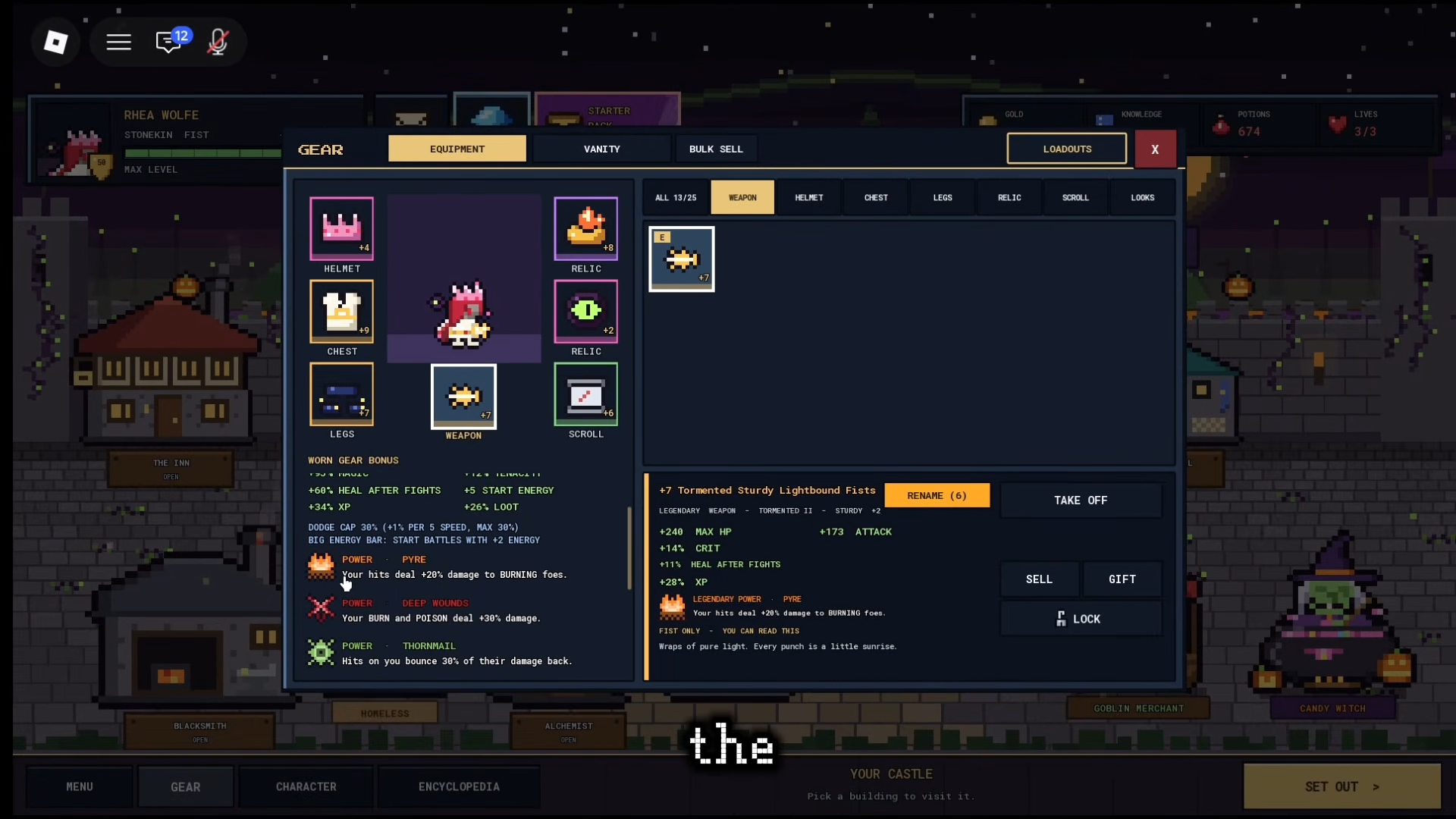
Selected +7 Lightbound Fists show Pyre +20% damage to burning foes and Fist-only restriction; left side is aggregate loadout
Owehnn · Source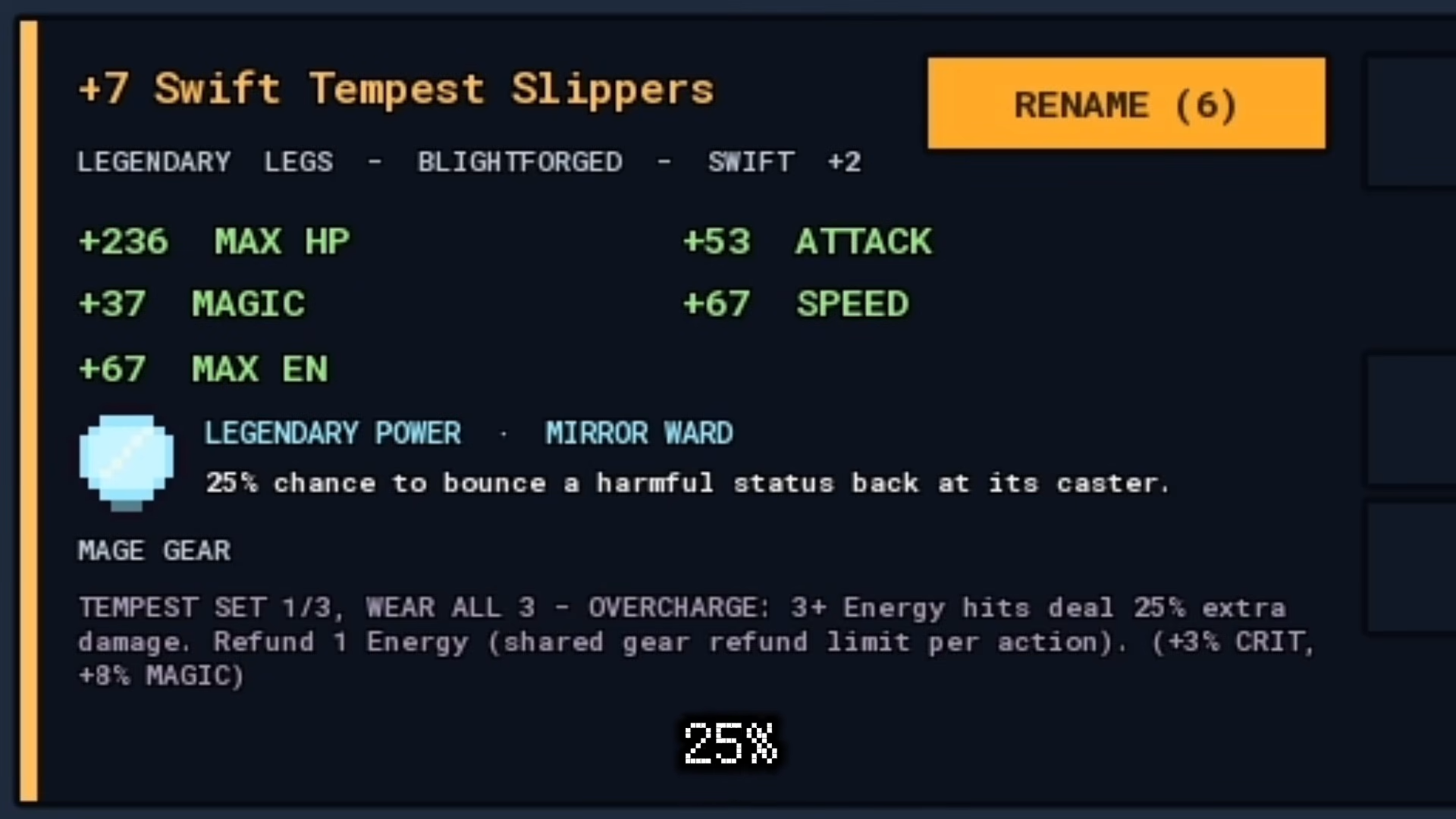
Selected +7 Swift Tempest Slippers show Mirror Ward25%status bounce and all-three Tempest condition with shared one-Energy refund limit
Owehnn · SourceRead the action before selling, gifting or locking
The Gear screen shows Sell, Gift, Lock and Bulk Sell controls alongside equipment actions. These controls have different purposes; none is necessary merely to inspect an item. Select the intended item and read the action before using it so a comparison does not become an unintended disposal.
The captures show the controls, not every confirmation dialog or the exact protection offered by Lock. Those details remain Pending confirmation. Do not use an untested lock rule as a guarantee against trading, deletion or character-loss consequences.
Watch the selected-item and worn-Power panels
The video switches from a weapon’s Pyre to a leg item’s Mirror Ward. Read the selected item name as the panel changes.
Gameplay excerpt; the text limits each claim to the recorded UI or stated explanation.
Owehnn · Source / open if playback failsSources
Reviewed:
Recorded build unknown; scoped UI examples
Video UI and player captures reviewed 14 October 2026; build unknown. Values belong to shown copies and previews.