
Quick Guide
- For Pixel Lineage talents, read the Trait panel and use the separate trait-reroll control when editing your hero. Quick Study’s captured tooltip gives +12% XP and +15% class mastery; confirm the saved trait rather than treating a race roll as a talent roll.
On this page
Pixel Lineage talents: inspect the Trait panel
Inspect the Trait panel in hero creation or Edit Your Hero. It is separate from the Race panel and starting-class choice. In the captured creation screen, Quick Study is Uncommon and its tooltip gives +12% XP and +15% class mastery.
That effect describes progression, not attack damage, healing or a complete skill kit. A character can have Nightborne in the race panel and Quick Study in the trait panel at the same time. Keeping the two labels separate prevents a race probability from being mistaken for the chance of obtaining a talent.
Use the displayed effect to decide whether the result fits the goal you have now. If you want experience and class-mastery progression, Quick Study’s wording addresses that goal; it does not establish the strongest combat talent. The supplied footage does not provide a complete verified roster, all talent probabilities or a same-condition talent tier list.
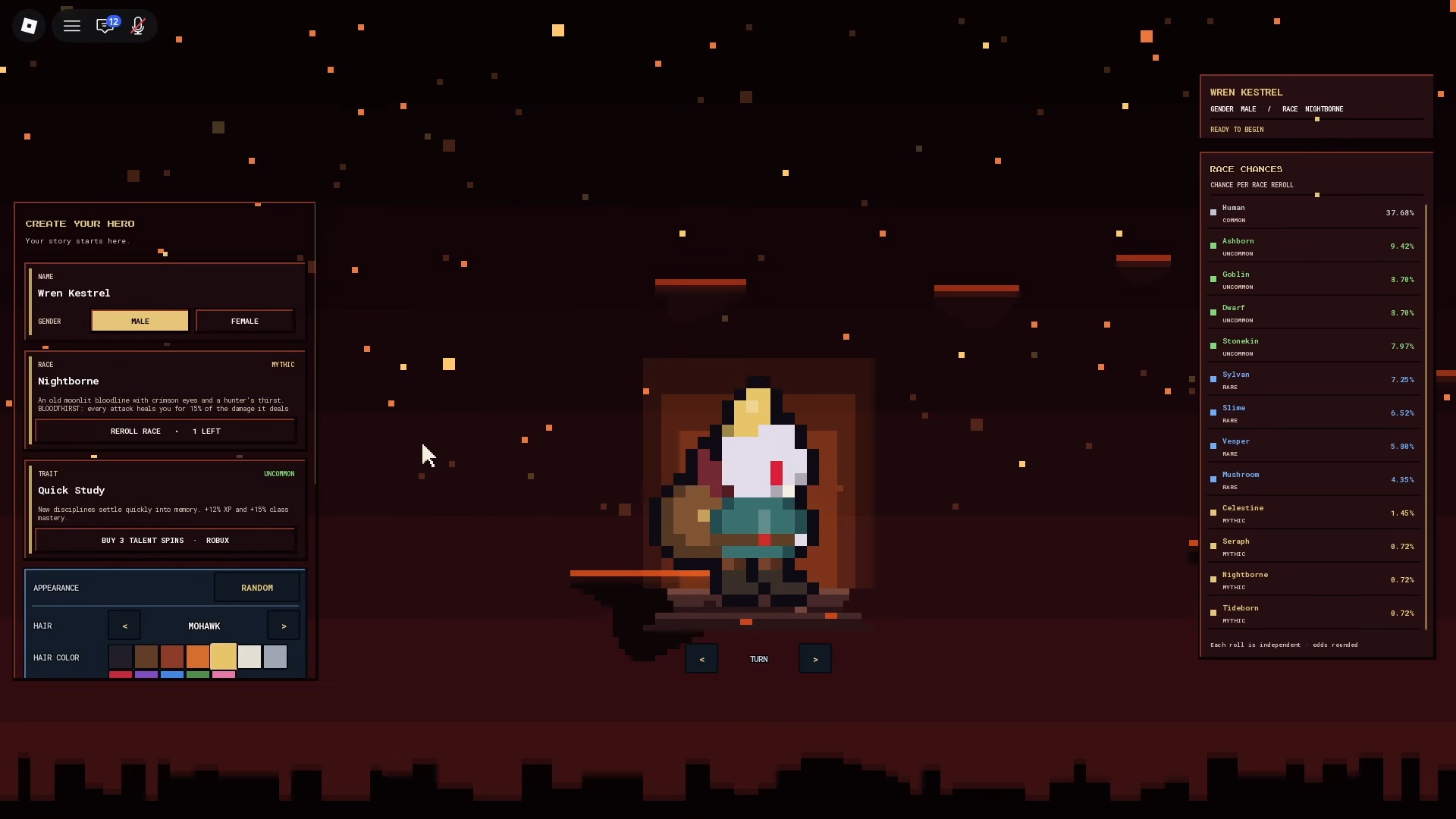
Hero creation shows Uncommon Quick Study with +12% XP and +15% class mastery, separate race roll and Talent Spins purchase button
OyO · SourceUse talent rolls rather than race rolls
The reviewed Edit Your Hero screen has separate REROLL RACE and REROLL TRAIT controls, and its text says progress stays when rerolling race or talent. Select the control for the field you actually want to change, read the resulting trait name and description, then use SAVE & PLAY to keep the displayed edit.
In OyO’s creation example, the Trait field instead shows BUY 3 TALENT SPINS — ROBUX after its available spins have been used. The race field still has a different remaining-roll counter. This demonstrates separate controls and a paid fallback offer in that recording, not a requirement to buy Robux to begin playing.
The player-supplied successful 0y0 code reward includes both race and talent spins. Redeem an eligible unused reward through the Goblin Merchant, then check the corresponding counters. A spoken code in an old video is not proof it is still available or unused on your account; use the Codes guide’s separate result statuses.
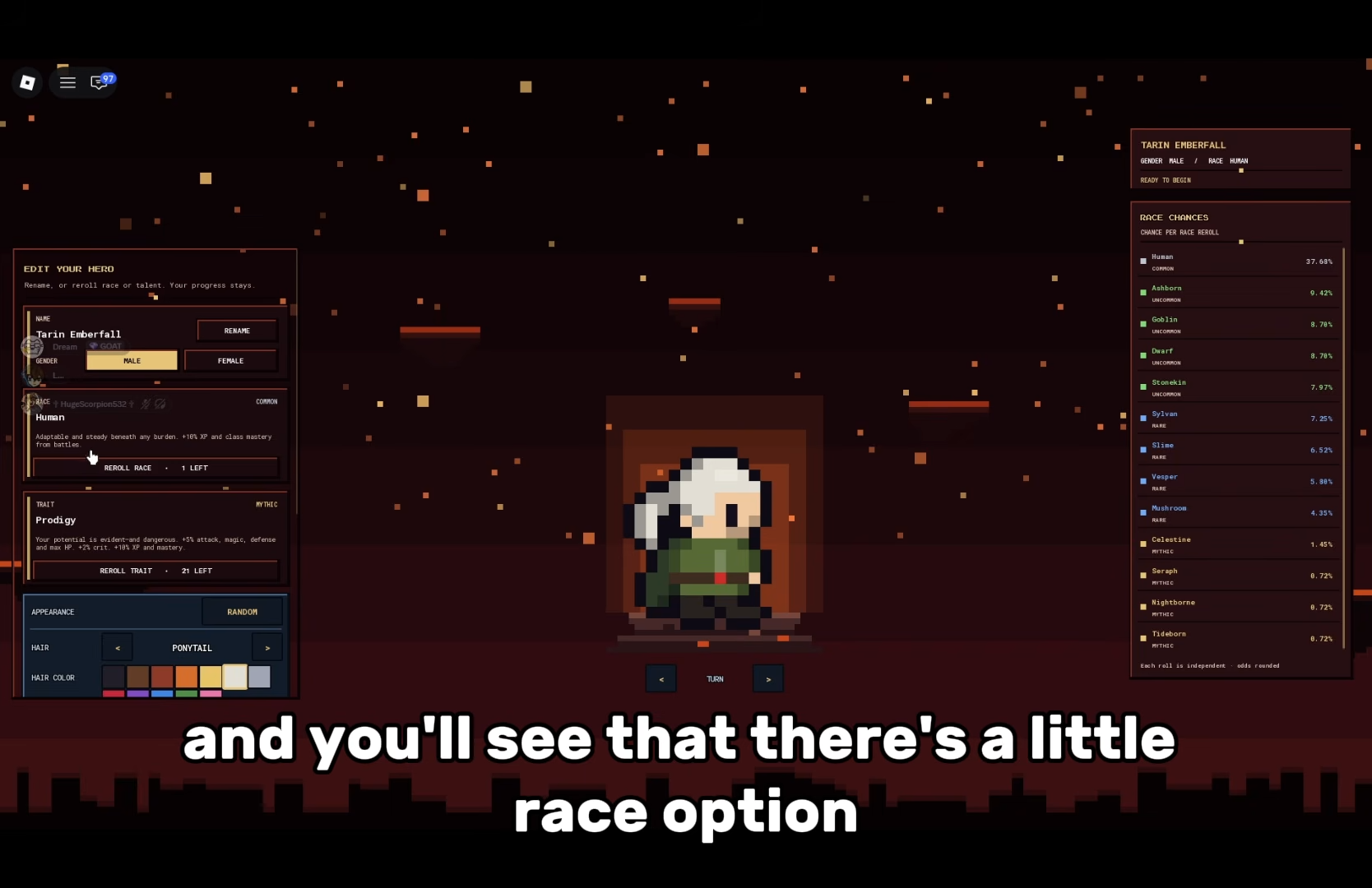
HugeScorpion · 0:25. Edit menu, reroll count and visible roster; odds belong to this recording.
HugeScorpion · SourceCheck the saved result before spending another spin
Rerolling a trait is not selecting a super class, spending Knowledge on an oath, or consuming a Bloodline evolution item. Those actions have different menus and success signals. When the goal is only to change the talent, the relevant result is the Trait name and tooltip you saved.
A purchase offer does not show a completed purchase, and the previewed bonus does not prove its measured effect in a fight or an XP trial. Pending confirmation: the full talent pool, individual roll chances, every cost option and whether a specific tooltip changes between versions. Keep a useful result instead of spending remaining spins to pursue a name that the current footage has not verified.
Watch the Quick Study selection
The short clip shows the Trait result alongside the separate race panel. It does not demonstrate all possible talent outcomes.
Gameplay excerpt; the text limits each claim to the recorded UI or stated explanation.
OyO · Source / open if playback failsSources
Reviewed:
Recorded build unknown; scoped UI examples
Video UI and player captures reviewed 14 October 2026; build unknown. Values belong to shown copies and previews.